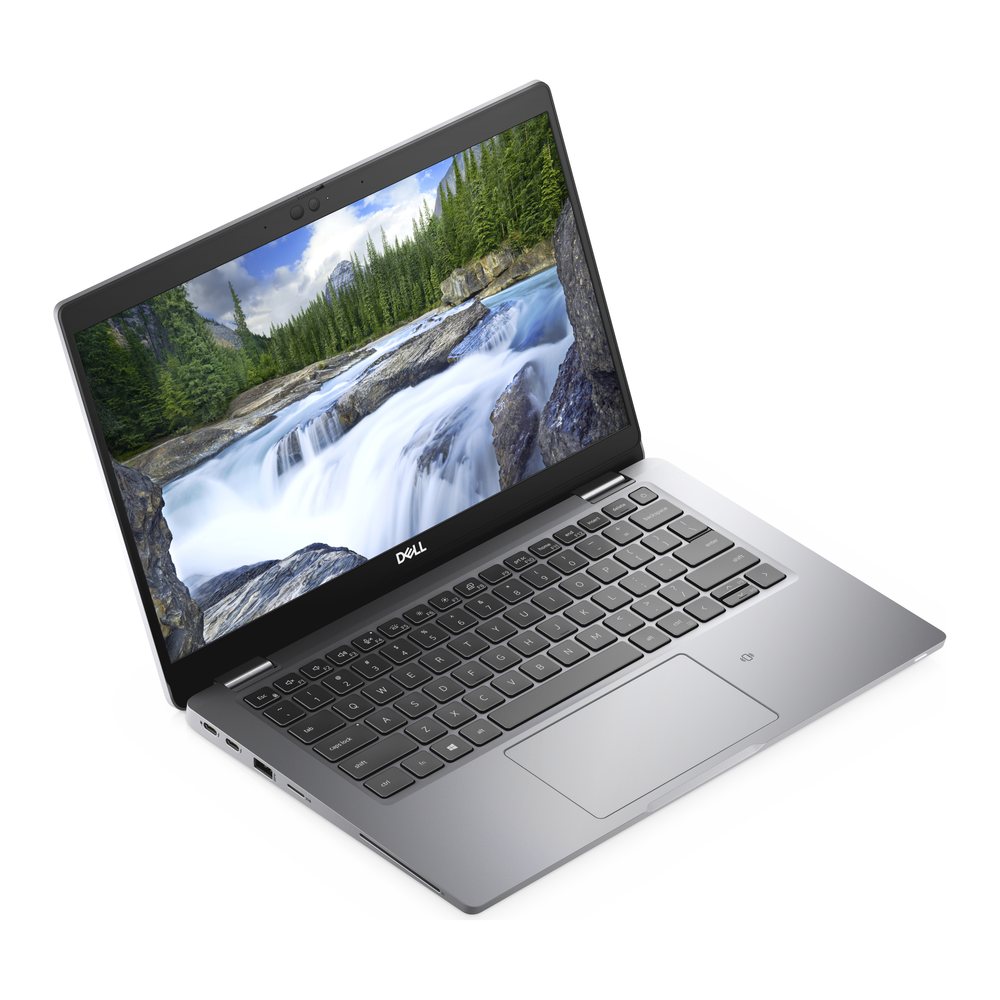
Quick answer: yes, the Dell Latitude 5320 is still worth buying in 2026 if you want a compact, reliable Windows 11 laptop for study or work on a budget. Ours is $320 AUD for a refurbished Grade A unit with an 11th Gen Intel Core i5, 16GB RAM, a 256GB SSD and a 13.3" Full HD touchscreen. It comes with a 12-month warranty and free tracked shipping Australia-wide from Melbourne. It isn't the brightest or the fastest laptop around, but at this price very little else gives you 16GB RAM, Thunderbolt 4 and HDMI in a 1.3 kg business build.
Dell Latitude 5320 at a glance
| Price (BetterSpec) | $320 AUD, includes GST, Grade A |
| Processor | Intel Core i5, 11th Gen, with Intel Iris Xe graphics |
| RAM / storage | 16GB RAM / 256GB SSD |
| Screen | 13.3" Full HD (1920 × 1080) touchscreen |
| Ports | 2 × Thunderbolt 4 / USB-C, USB-A, HDMI, 3.5mm audio |
| Size and weight | About 17mm thick and about 1.3 kg |
| Operating system | Windows 11, fresh install |
What the Latitude 5320 is
The Latitude 5000 series is Dell's mainstream business range, bought in bulk by companies, schools and government. That's why so many come back into the market after a lease ends, and why they're such good value refurbished. The 5320 is the 13.3" model from the 11th Gen Intel generation. It's small enough to carry all day and has the full set of ports a business laptop needs.
Performance: what 11th Gen i5 and 16GB RAM handle
For everyday work it's quick. Microsoft 365, Google Docs, 20+ browser tabs, Teams and Zoom calls, Canva, streaming and light photo editing all run smoothly. The 16GB of RAM matters more than the processor here. Many budget laptops in this price range have 8GB, which starts to struggle once you have lots of tabs and a video call open at the same time.
What it isn't built for: modern 3D gaming, 4K video editing or heavy engineering software. If that's you, you need a laptop with a dedicated graphics card, which is a different price bracket.
One thing to know: the RAM is soldered to the board, so you can't upgrade it later. With 16GB already fitted, that's not a problem for most people. The SSD is a standard M.2 NVMe drive, so storage can be upgraded if you ever need more than 256GB.
Battery life
When the 5320 was new, LaptopMedia measured almost 14 hours of web browsing on the larger 63Wh battery at low brightness. A refurbished laptop won't match a brand-new lab result, because every battery has aged differently and real use (brighter screen, video calls) drains it faster. That's why we test every battery before we grade it rather than promise a set number of hours. Our laptop battery health guide explains what a healthy battery percentage looks like and how to check it yourself.
Screen, keyboard and ports
The 13.3" Full HD touchscreen is sharp at this size and has good viewing angles. Its weak point is brightness: it's fine indoors, but reviewers found it dim and hard to read in direct sunlight, and colours are accurate enough for office work rather than photo editing. If the screen matters most to you, the Surface Laptop 3 has a taller, sharper 3:2 display.
The keyboard is comfortable for long essays and reports, and the touchpad is large. The webcam is 720p, which is fine for Teams and Zoom but not amazing.
Ports are where it beats most budget laptops. You get HDMI for a TV, monitor or projector, USB-A for older mice and USB sticks, and two Thunderbolt 4 / USB-C ports for charging, fast storage and single-cable docks. It charges over USB-C, so one charger can cover your laptop and phone. There's no Ethernet port, so you'll need a cheap USB adapter if you want wired internet.
Downsides to know before you buy
- Screen brightness: fine indoors, not great outside.
- RAM can't be upgraded: buy the 16GB you need now (ours already has it).
- Not a 2-in-1: the screen is touch, but it doesn't fold into a tablet.
- Basic webcam: 720p is OK for calls, not for content creation.
Dell Latitude 5320 vs the alternatives
Here's how it compares with the other laptops we have in stock right now (prices in AUD, including GST):
| Model | Price | CPU / RAM / SSD | Best for |
|---|---|---|---|
| Dell Latitude 5320 | $320 | i5 11th Gen / 16GB / 256GB | Best value all-rounder |
| HP EliteBook x360 830 G7 | $339 | i5 10th Gen / 8GB / 256GB | Cheapest 2-in-1 that folds into a tablet |
| HP EliteBook x360 830 G8 | $415 | i5 11th Gen / 16GB / 256GB | Same power as the Dell, plus 2-in-1 |
| Microsoft Surface Laptop 3 | $415 | i5 10th Gen / 16GB / 256GB | Nicest screen and slim design |
If you'd like the Dell's performance plus a screen that folds back into a tablet for notes, the HP 830 G8 is the step up. Our HP EliteBook x360 comparison covers the HP range in detail. You can also browse all refurbished laptops or touchscreen laptops.
Who should buy it
The Latitude 5320 is a great fit for uni and TAFE students, small businesses, tradies doing quotes and invoices, and anyone working from home who wants a dependable laptop without spending $1,000+. It's also an easy pick for a family laptop or a second machine. See how it stacks up in our best refurbished laptops for uni guide.
What you get from BetterSpec
Every Latitude 5320 we sell is tested on our 15-point laptop check, honestly graded (see Grade A vs Grade B), securely wiped and given a fresh Windows 11 install. It comes with a 12-month warranty and 14-day change-of-mind returns. Standard shipping is free and tracked Australia-wide: we dispatch from Melbourne in 1–2 business days, and delivery takes 2–7 business days (express is $15). You can pay by Visa, Mastercard, Amex, Apple Pay or Google Pay.
FAQ
Is the Dell Latitude 5320 good for uni?
Yes. With an 11th Gen i5 and 16GB RAM it handles assignments, research with lots of tabs, online lectures and Microsoft 365 easily, and at about 1.3 kg it's light enough to carry around campus every day.
Does the Dell Latitude 5320 have HDMI?
Yes. It has a full-size HDMI port, plus two Thunderbolt 4 / USB-C ports that can also drive external monitors or connect to a USB-C dock.
Can you upgrade the RAM in a Dell Latitude 5320?
No, the RAM is soldered to the motherboard. Ours comes with 16GB, which is plenty for study and office work. The M.2 SSD can be upgraded.
How much is a refurbished Dell Latitude 5320 in Australia?
Ours is $320 AUD including GST for a Grade A unit with 16GB RAM and a 256GB SSD, with free tracked shipping and a 12-month warranty.
We test, grade and set up every laptop and tablet we sell in Melbourne. These guides share what we've learned so you can buy refurbished tech with confidence.
Skip the guesswork.
Tested, graded and backed by a 12-month warranty.

